Everything you need to run your venue
MyHallWizard is a complete booking and invoicing system designed for community venues. Here's what's included.
Booking management
Create and manage bookings for any combination of rooms, with full control over dates, times, pricing and extras.
- One-off and repeat bookings
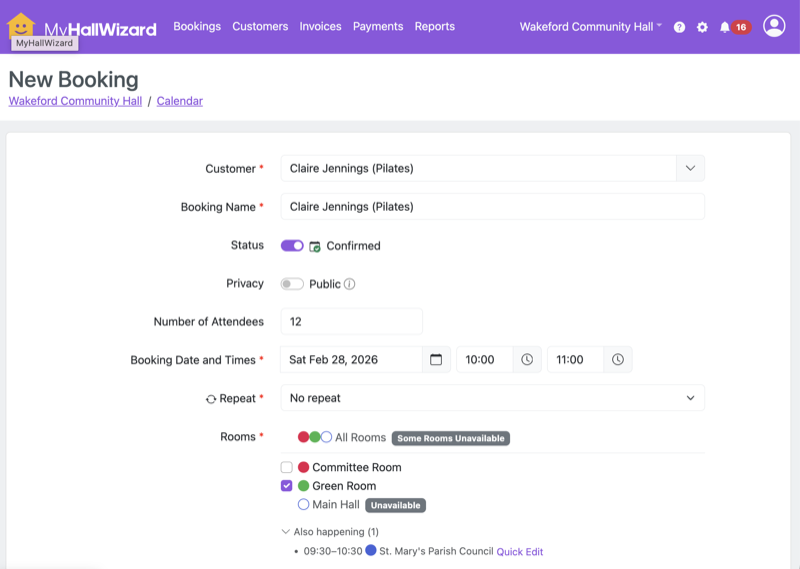
- Set up single bookings or repeating series — daily, weekly, monthly or yearly. A live preview shows exactly which dates will be created, and flags any room clashes before you save.
- Live room availability
- Available rooms are shown as ready to select. Unavailable rooms are greyed out with a note telling you when they're free. An "Also happening" section shows what else is booked at the same time.
- Repeat booking management
- A dedicated Repeat Bookings page shows all your series at a glance, with status badges for each booking. Edit or delete a series and an impact preview tells you exactly which bookings will be affected.
- Sidebar cards
- Every booking page shows collapsible information cards in the sidebar — customer details, repeat series info, and the original enquiry. Colour-coded alerts flag overdue payments, unsent invoices, and bookings that still need invoicing.
- Quick actions
- View, edit, duplicate or delete bookings directly from the table — no need to open each record first.
Calendar
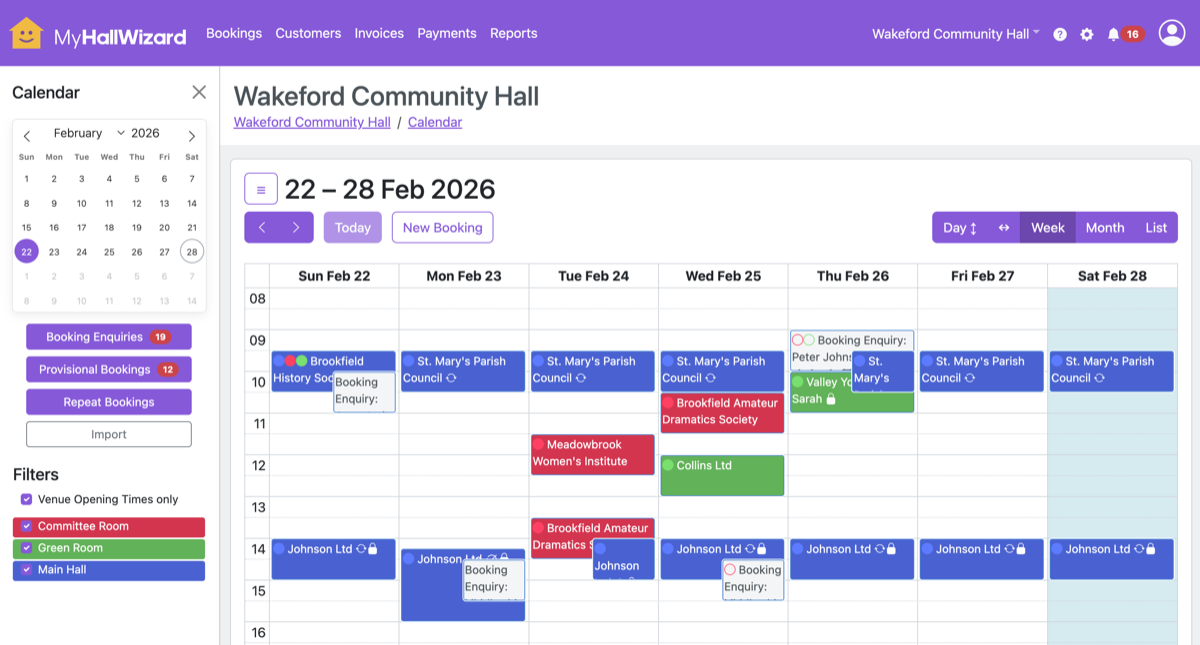
A colour-coded calendar that gives you a clear picture of what's happening across every room.
- Month, week and day views
- Switch between a monthly or weekly overview and detailed day views. On smaller screens, the list view makes for easy reading.
- Drag and drop
- Move bookings by dragging them to a different time or room. A quick way to rearrange your schedule without opening the booking form.
- Public calendar
- Embed a read-only calendar on your own website so hirers can check availability before getting in touch. Private booking details stay hidden.
- Configurable time slots
- Choose 15, 30 or 60-minute intervals for your time pickers and calendar grid. Set a minimum booking duration to prevent very short bookings.
Booking enquiries
Let hirers request time slots online. Review their details, check availability, and convert approved enquiries into bookings.
- Online enquiry form
- A public form that hirers can use to request bookings on your website. Time pickers respect your venue's opening hours and minimum booking duration.
- Repeat enquiries
- Hirers can request regular slots too. They'll see a preview of any dates with room conflicts before submitting.
- Review and convert
- Enquiries arrive with the hirer's details and requested times. Approve or decline with one click, and approved enquiries convert straight into bookings.
- Advanced settings
- Require address fields, limit how far ahead customers can book, add custom guidance text, and choose which rooms to include on the booking enquiry form.


Invoicing
Generate accurate invoices at the touch of a button. What used to take hours each month can be done in about 30 minutes.
- One-click generation
- Prices are calculated automatically from your price lists and bookings. Generate an invoice, check it, and send it — all in about a minute.
- Professional PDF invoices
- Invoices are emailed as a professional PDF with your venue details, line items, and payment instructions.
- Status tracking
- Track invoices through Draft, Sent, Overdue and Paid. See at a glance who has paid and who needs chasing.
- Flexible price lists
- Set different rates for different hirers, rooms and time periods. Assign customer-specific price lists for community groups, charities, or regular hirers.
- Customisable templates
- Add your own text at the top or bottom of invoices. Configure payment terms, tax settings, and display options.
“MyHallWizard is very intuitive to use and straightforward to set up and operate. I particularly like the flexible way to enter bookings, such as regular bookings or even ones that happen only once a month. Cancelling and amending bookings is very easy, too, and the invoicing facility allows for tracking paid and unpaid invoices.”

Annette
The Spire Church, Farnham
Payments
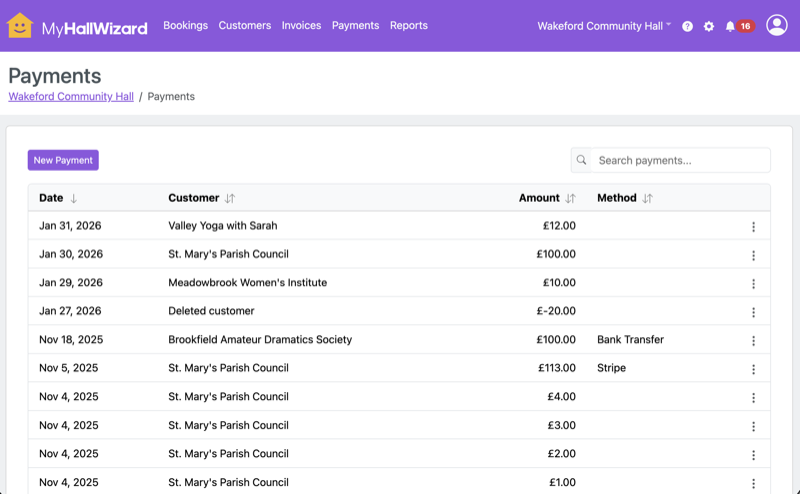
Accept payments online or record them manually. Keep track of who has paid and who hasn't.
- Online card payments
- Accept card payments securely via Stripe. Hirers pay directly from their invoice email, and payments are reconciled automatically.
- Multiple payment methods
- Record cash, cheque and bank transfer payments alongside card payments. Configure payment instructions for each method.
- Payment tracking
- Allocate payments against invoices. Track partial payments, outstanding balances, and generate customer statements of account.
Customer management
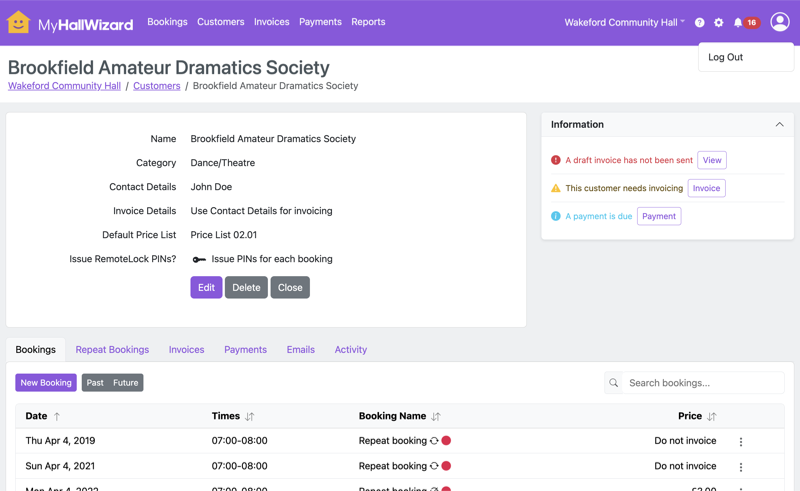
Keep all your hirers' details in one place, from contact information to booking history and billing preferences.
- Customer records
- Store contact details, addresses, billing preferences and notes for every hirer. Categorise customers by type — community groups, businesses, individuals, and more.
- Custom price lists
- Assign customer-specific pricing price lists. Give regular hirers or community groups discounted rates that apply automatically to their bookings.
- Activity trail
- A full audit trail of every change — who made it, and when. Useful for keeping track of what's been agreed, or when a colleague asks "who changed this?"
- Bulk import
- Moving from another system? Import your customer and booking records in bulk to get up and running quickly.
Team & access control
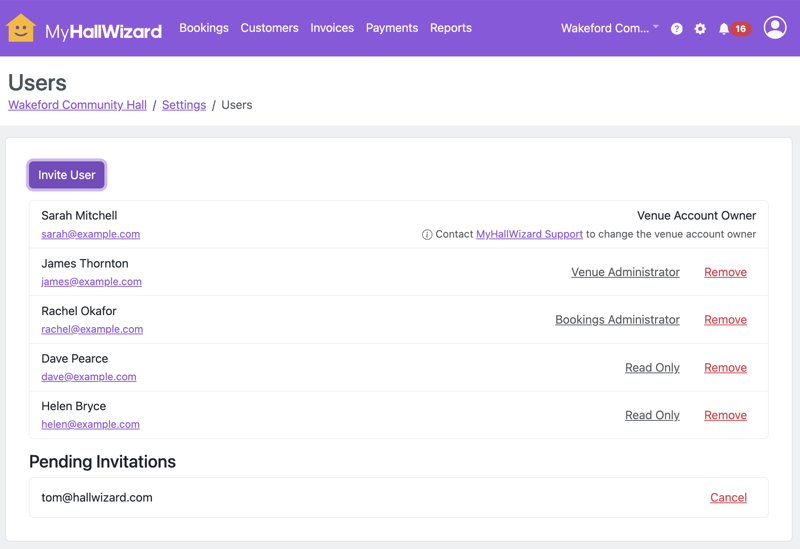
Give the right people the right level of access. Whether it's a single volunteer or a team of staff, everyone gets exactly what they need.
- Role-based access
- Four built-in roles — Venue Owner, Venue Administrator, Bookings Administrator and Read Only — each with appropriate permissions. Venue owners have full control; read-only users can view without changing anything.
- Multiple users
- Invite as many team members as you need. Everyone works from the same live data, so there's no risk of conflicting changes or out-of-date information.
- Audit trail
- See who made every change and when. Useful for accountability, handovers, and answering "who changed this?" questions.
Reports and exports
Understand how your venue is being used and keep your accounts up to date.
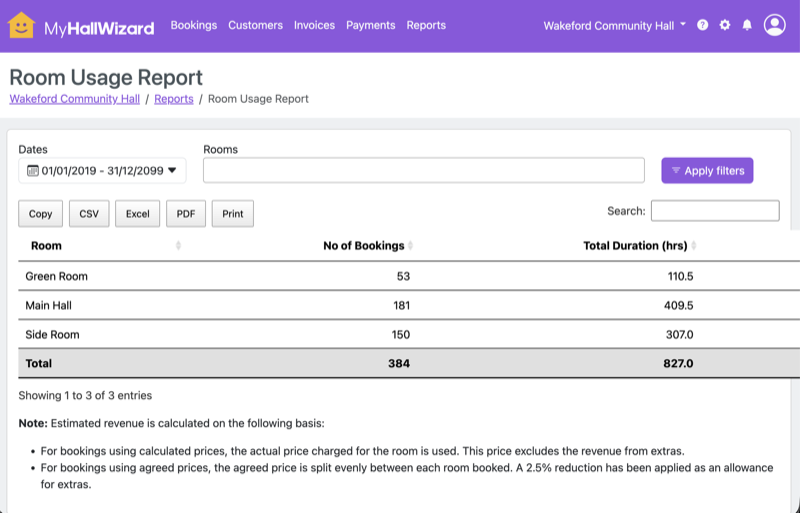
- Built-in reports
- Room usage, bookings by month, unpaid invoices, customer statements, payment reconciliation, and more. Click through from any report row to the related booking, customer or invoice.
- CSV exports
- Export bookings, customers and invoices to spreadsheets for further analysis or record-keeping.
- Accounting software integration
- Export invoices and payments to Xero, QuickBooks or QuickFile. Keep your accounts in sync without manual data entry.
Emails and notifications
Keep hirers informed automatically, and know for certain that your emails arrived.
- Automated emails
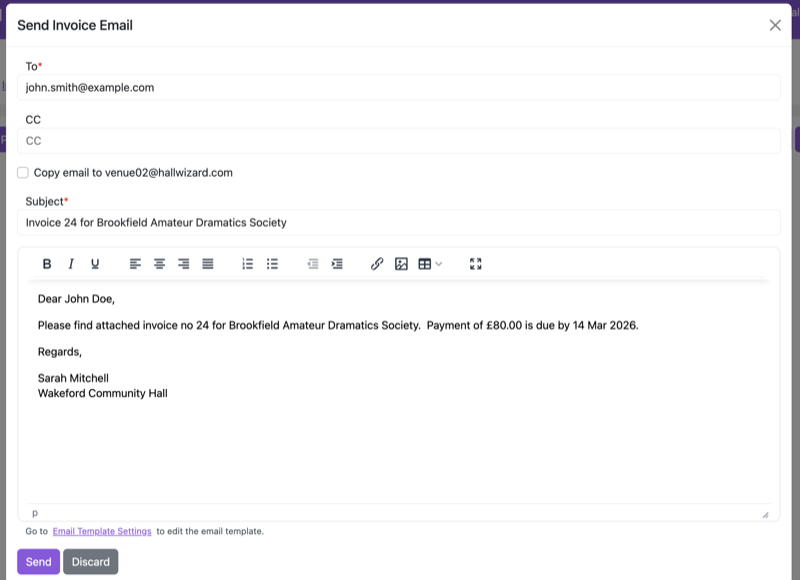
- Booking confirmations, change notifications, reminders, and invoice emails — all sent automatically at the right time.
- Customisable templates
- Edit every email template to match your venue's tone. Use merge fields to personalise messages with customer names, booking details and prices.
- Delivery status
- See whether each email was Sent, Delivered, Bounced or flagged as a Complaint. No more wondering whether a confirmation email actually got through.
- Booking reminders
- Automatically send reminders a configurable number of days before each booking. Useful for reducing no-shows.
Integrations
Connect MyHallWizard with the tools and hardware your venue already uses.
RemoteLock
Generate unique entry codes for each booking automatically. No more key safes, lost keys, or meeting hirers at the door.
HeatingSave
Set the temperature for each booking automatically via smart thermostats. Venues report energy savings of 20–50%.
Stripe
Accept secure online card payments. Hirers pay from their invoice email, and payments are reconciled automatically.
Xero, QuickBooks & QuickFile
Export invoices to your accounting software. Keep your books in sync without manual data entry.
iCal
Subscribe to your booking calendar from any calendar app — Google Calendar, Apple Calendar, Outlook, and more.
Public calendar embed
Add a live calendar to your venue's website with a simple embed code. Works on all screen sizes, including mobile.
Ready to try it?
Join community venues around the world who have moved from paper diaries and spreadsheets to MyHallWizard. Try it free.
- No credit card required
- Free use of all features
- Customer support
- No unexpected charges after your trial